

7 Best Polymarket Wallets For Secure Trading in 2026
We believe in full transparency with our readers. Some of our content includes affiliate links, and we may earn a commission through these partnerships. However, this potential compensation never influences our analysis, opinions, or reviews. Our editorial content is created independently of our marketing partnerships, and our ratings are based solely on our established evaluation criteria. Read More





Based on our research, the best Polymarket wallet in 2026 is Best Wallet. This non-custodial wallet supports USDC on Polygon, Ethereum, Solana, BNB Chain, and Base, allowing unmatched flexibility when betting and withdrawing from Polymarket. You can also interact with Polymarket directly from the wallet, using WalletConnect. Thanks to its integrated DEX, you can buy USDC at the best rates. Moreover, you won’t need to complete KYC verification.
To find the best wallets for Polymarket traders, we tested over 50 providers and selected them based on their native Polymarket integration, multi-chain support for USDC, and security features. We also gave an advantage to wallets that offer extra features, like wallet tracking and integration with Polymarket’s copy-trading bots.
Keep reading to find out which wallet providers made it to our list and what sets them apart.
- In This Article
-
- 1. Best Wallet - Best Polymarket Wallet Overall
- 2. Coinbase Wallet (Now Base App) - Best Polymarket Wallet for Discovering Trending Prediction Market Events
- 3. MetaMask - The Best Polymarket Wallet for Copy-Trading
- 4. Binance Wallet - The Best Polymarket Wallet for Binance Smart Chain Integration
- 5. Phantom Wallet - The Best Polymarket Wallet for Tracking
- 6. Trust Wallet - The Best Polymarket Wallet for Beginners
- 7. Ledger - The Best Polymarket Wallet for Cold Storage Security
- In This Article
-
- 1. Best Wallet - Best Polymarket Wallet Overall
- 2. Coinbase Wallet (Now Base App) - Best Polymarket Wallet for Discovering Trending Prediction Market Events
- 3. MetaMask - The Best Polymarket Wallet for Copy-Trading
- 4. Binance Wallet - The Best Polymarket Wallet for Binance Smart Chain Integration
- 5. Phantom Wallet - The Best Polymarket Wallet for Tracking
- 6. Trust Wallet - The Best Polymarket Wallet for Beginners
- 7. Ledger - The Best Polymarket Wallet for Cold Storage Security
- Show Full Guide
The Best Polymarket Wallets Compared
Here’s a list of our top-rated Polymarket wallets in 2026:
| Wallet | Wallet Type | Built-In Polymarket Support | Supported Deposit Networks | Best For |
|---|---|---|---|---|
| Best Wallet | Software, non-custodial | No | Polygon, Ethereum, Solana, BNB Chain, Base | Best Polymarket wallet overall |
| Coinbase Wallet (Base App) | Software, non-custodial | No | Polygon, Ethereum, Base, Arbitrum, Optimism, Avalanche | Discovering trending prediction market events |
| MetaMask | Software, non-custodial | Yes | Polygon, Ethereum, Base, Arbitrum, BNB Chain | Polymarket copy-trading |
| Binance Wallet | Software, non-custodial | Yes | Polygon, Binance Smart Chain, Base, Solana, Ethereum | Polymarket Binance Smart Chain integration |
| Phantom Wallet | Software, non-custodial | Yes | Polygon, Base, Ethereum, Solana | Polymarket wallet tracking |
| Trust Wallet | Software, non-custodial | No (coming soon) | Polygon, BNB Smart Chain, Solana, Ethereum, Base | Beginners |
| Ledger | Hardware, non-custodial | No | Polygon, Ethereum, Solana, Arbitrum | Cold storage security |
The Best Polymarket Wallets in 2026: Full Reviews
Check out our in-depth reviews to find out why the above-mentioned wallet providers found a spot on our list.
1. Best Wallet – Best Polymarket Wallet Overall
Best Wallet is a non-custodial wallet that supports 1,000+ coins and 60+ blockchains, including USDC on Polygon, Ethereum, Solana, BNB Chain, and Base. This wallet lets you interact with Polymarket directly in the app, even though it doesn’t have built-in support for Polymarket. To connect to Polymarket, you must use WalletConnect – scan the QR code and sign the message to prove your ownership.
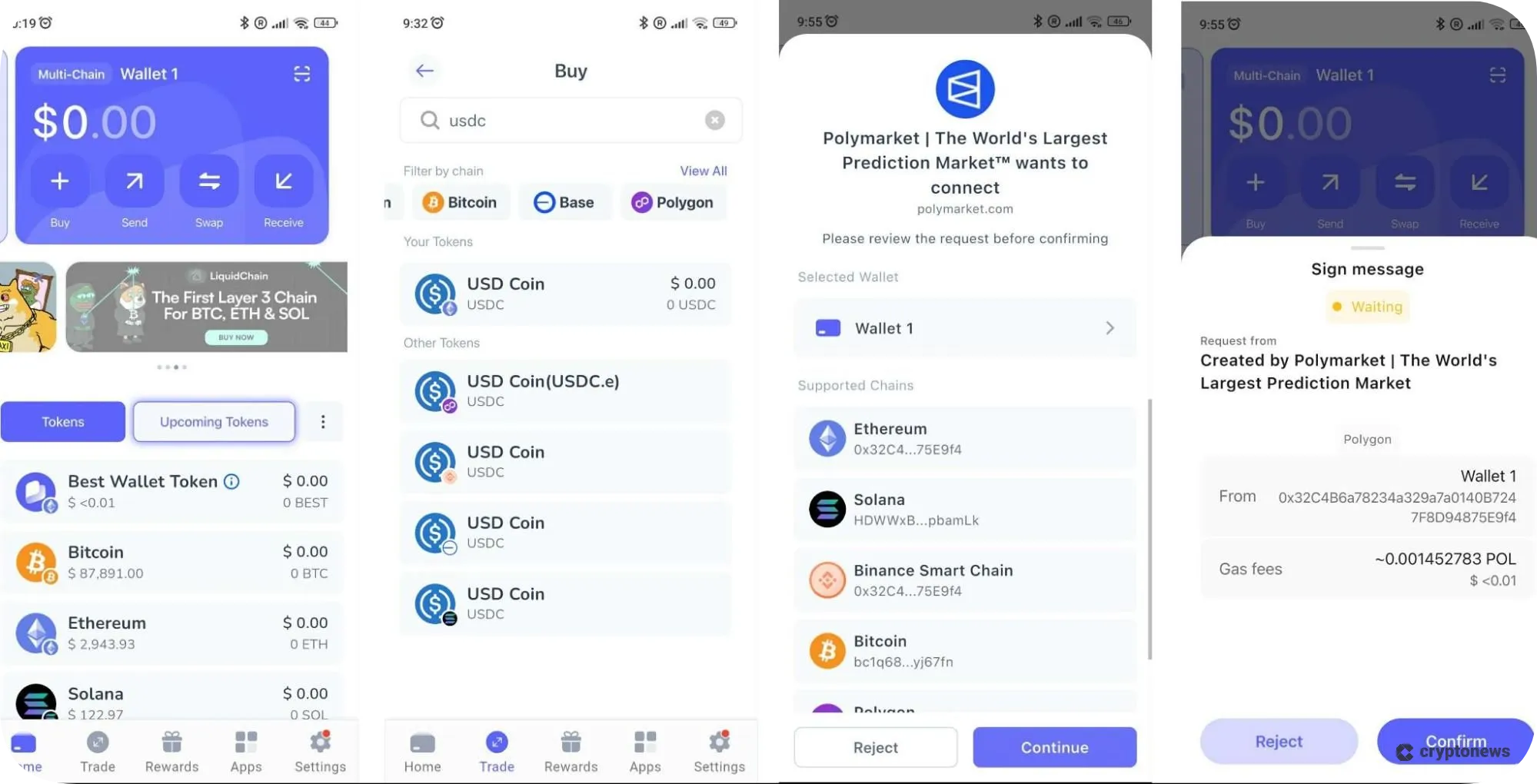
Best Wallet also has an integrated DEX aggregator that lets you buy USDC at the best rates without using external exchanges or going through KYC verification. Plus, you can buy crypto with fiat, which is not often possible with non-custodial wallets. Best Wallet uses advanced security features, including MPC technology, encrypted cloud backups, and biometric authentication. Its other notable features include dApps iGaming hub, upcoming tokens page, and rewards programs.
Best Wallet also has an in‑app crypto wallet portfolio management feature and allows you to create multiple wallets, so you can segregate your Polymarket funds from other assets. However, we should note that Best Wallet is only available on mobile devices, although a browser extension is coming soon.
Best Wallet Key Features
- Supports USDC on Polygon (USDC.e), Ethereum, Solana, BNB Chain, and Base.
- Buy USDC with fiat and at the best rates via its integrated DEX.
- Uses advanced security – MPC key-share technology, encrypted cloud backups, and biometric authentication.
Pros
- Supports 1,000+ coins across 60+ blockchains, including USDC on Polygon (USDC.e)
- Integrated DEX aggregator
- Simple interface
- Advanced security
- Upcoming tokens page
Cons
- Most of its advanced features are yet to be released
2. Coinbase Wallet (Now Base App) – Best Polymarket Wallet for Discovering Trending Prediction Market Events
Coinbase Wallet, now Base App, can be described as the super app that merges DeFi with social media and community features. You can use it to buy USDC on Polygon, Ethereum, Base, Arbitrum, Optimism, and Avalanche, chat with AI agents, as well as follow Polymarket analysts and traders. You can also take advantage of its integrated social feed to discover events that are trending on prediction markets.
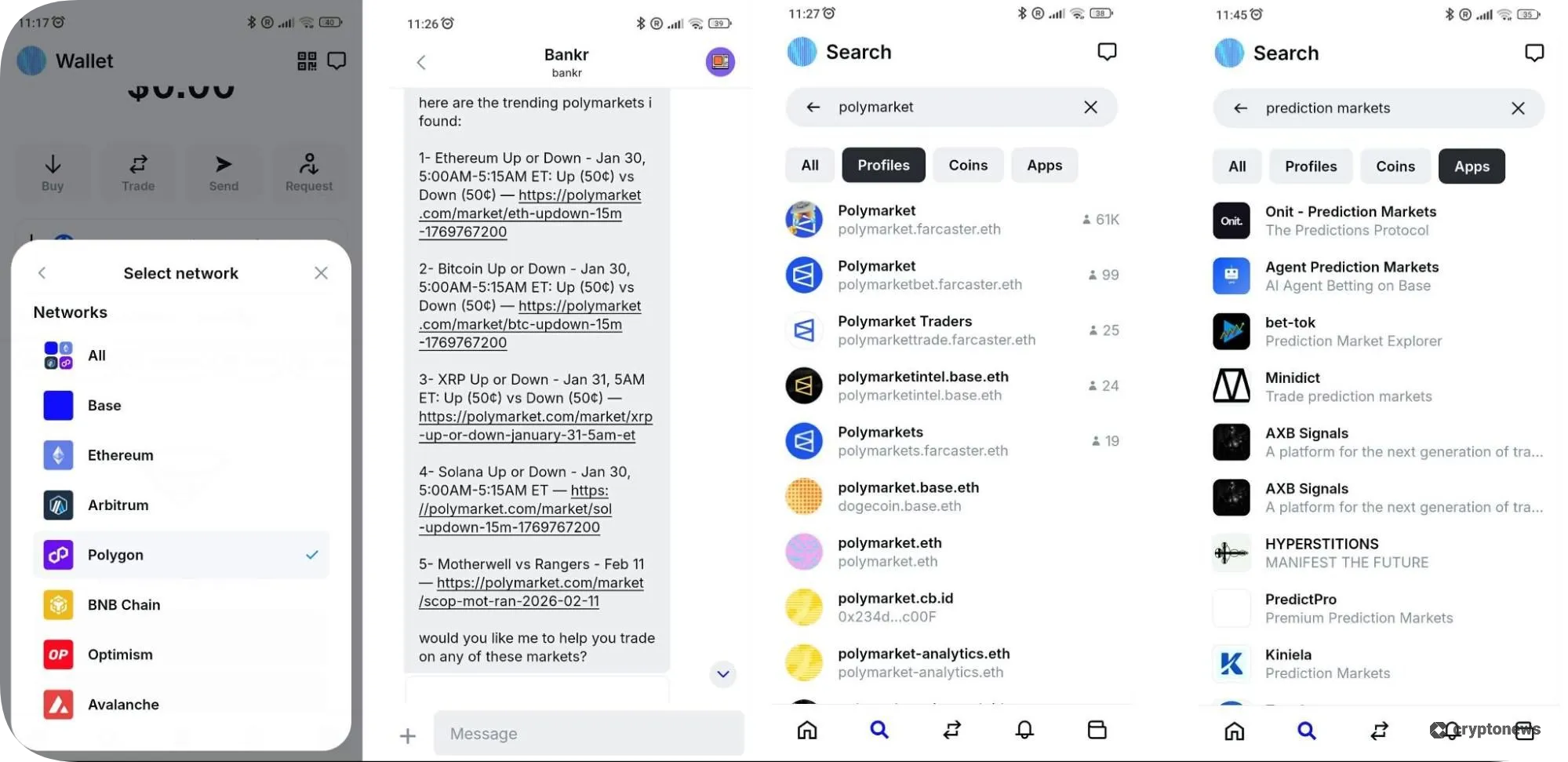
However, what we liked most was its built-in dApp browser, which lets you interact with popular prediction-market mini-apps, such as Minidict and Hyperstitions. Like Best, the Coinbase Wallet doesn’t have built-in support for Polymarket, so you’ll need to use WalletConnect.
On the downside, this non-custodial wallet may feel complex for beginners due to its advanced features. Its interface has many menus and options, so it may take some time to learn how to make the most of it.
Coinbase Wallet Key Features
- Buy USDC on Polygon, Ethereum, Base, Arbitrum, Optimism, and Avalanche.
- Follow Polymarket analysts and traders to discover trending events on prediction markets.
- Interact with prediction-market mini-apps, such as Minidict and Hyperstitions.
Pros
- Supports multi-chain USDC support
- Supports prediction-market mini-apps
- Integrated social feed
- Built-in dApp browser
- Enables you to post and monetize your content
Cons
- May feel complex for beginners
3. MetaMask – The Best Polymarket Wallet for Copy-Trading
MetaMask is one of the few wallets that have built-in Polymarket support. You can access Polymarket directly in the app without using WalletConnect. You just need to tap two buttons – Trade and Predictions. You can buy USDC on Polygon, Ethereum, Base, Arbitrum, and BNB Chain. However, you can also fund your account with any token on the EVM chain because MetaMask automatically swaps them to USDC on Polygon.
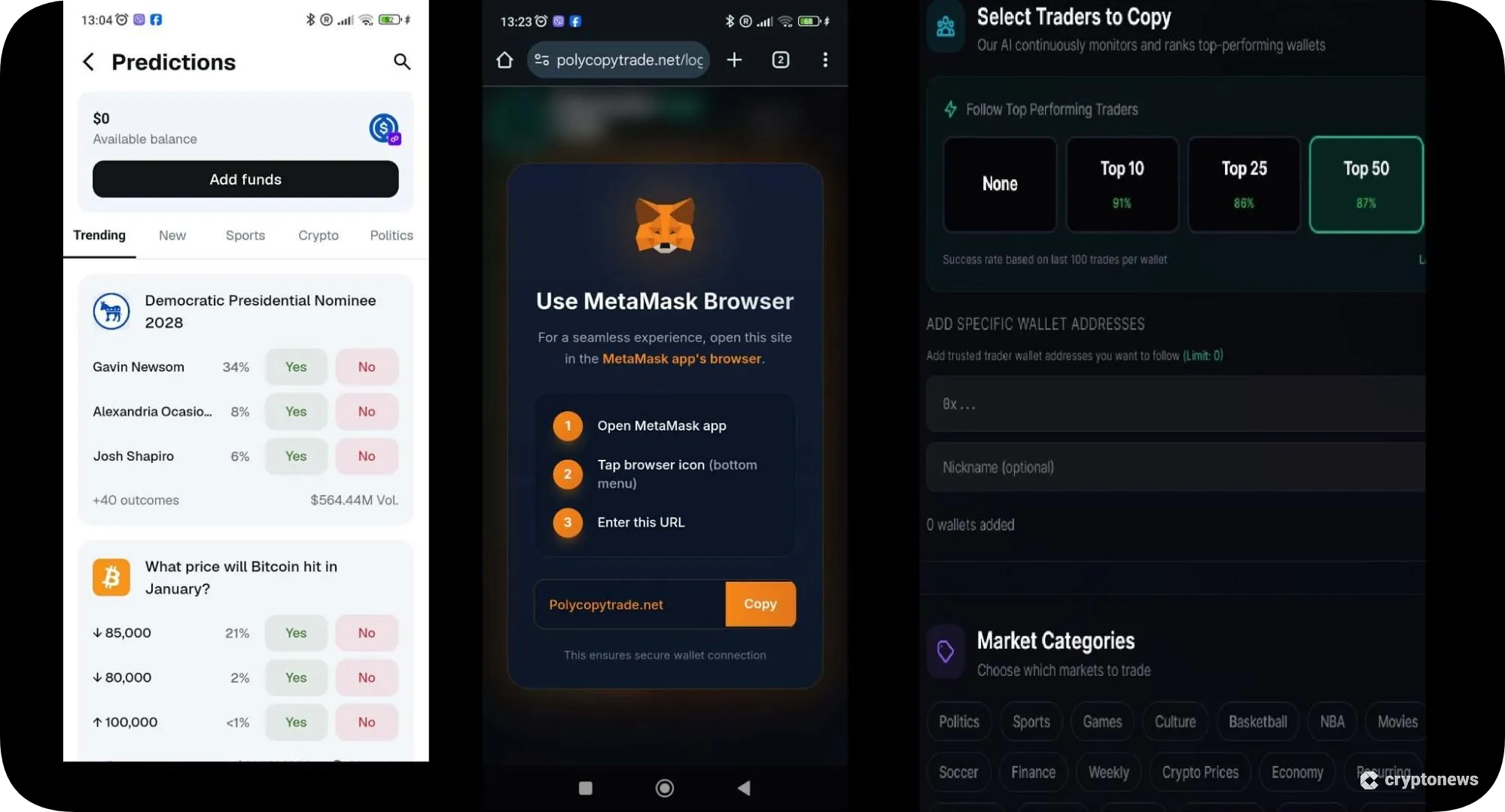
This non-custodial wallet is suitable for copy traders because it integrates with Polymarket’s copy-trading bots. You can track Polymarket wallet users based on their performance, expertise, and trading style. However, we noticed that this option is only possible through MetaMask’s web browser.
While MetaMask doesn’t charge deposit or withdrawal fees, to make predictions, you must pay a 4% transaction fee, which is split between MetaMask and Polymarket. On a positive note, you earn 2 points (used for rewards within the wallet) for every $1 trade placed on prediction markets. You can also connect MetaMask to some of the best decentralized prediction markets, like Overtime and PRDT.
MetaMask Key Features
- Built-in Polymarket support lets you access prediction markets directly from the wallet.
- The wallet’s browser extension can be integrated with Polymarket’s copy-trading bots.
- MetaMask automatically swaps tokens on the EVM chain to USDC on Polygon.
Pros
- Fund your account with any token on the EVM chain
- Gain access to prediction markets directly from the app
- Supports Polymarket’s copy-trading bots
- Earn points by participating in prediction markets
Cons
- Polymarket’s copy-trading bots cost between $99 and $499 per month
- To make predictions, you must pay a 4% transaction fee
4. Binance Wallet – The Best Polymarket Wallet for Binance Smart Chain Integration
Polymarket recently added support for BNB deposits and withdrawals. You can now participate in prediction markets using BNB on BSC. This is where Binance Wallet comes into play. This non-custodial wallet supports BNB Smart Chain natively, so you can fund your Polymarket account without bridging.
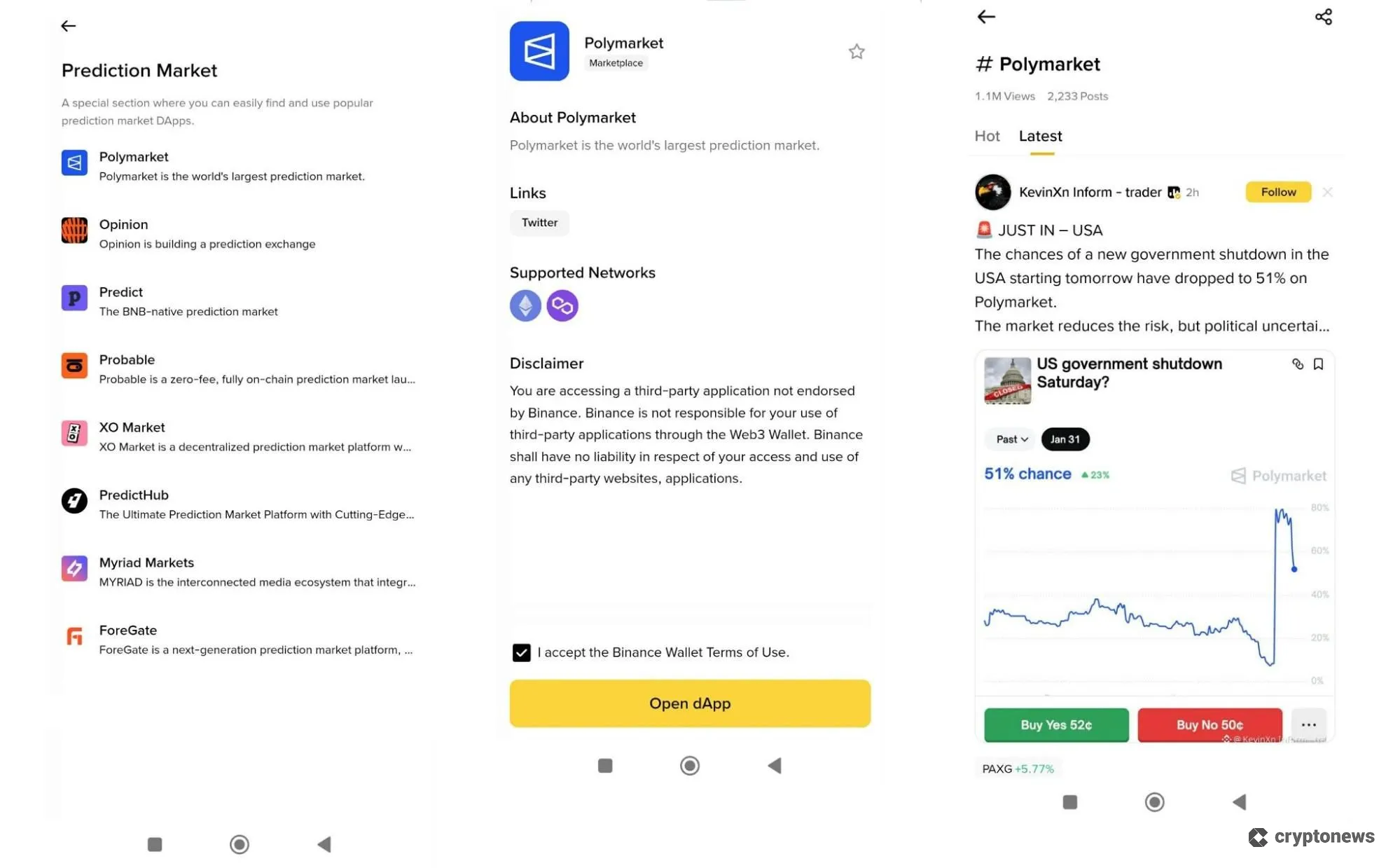
You can also use its integrated dApp browser to connect to Polymarket and other popular prediction market dApps, such as Opinion, Predict, Probable, XO Market, PredictHub, Myriad Markets, and ForeGate, directly from the wallet. We also liked its new feature, the social tracker, which lets you follow trending Binance Square accounts, letting you find and creators who share their insights about Polymarket.
The biggest drawback of using this wallet is that you must have an account on Binance, and Binance requires mandatory KYC verification.
Binance Wallet Key Features
- Supports BNB Smart Chain natively – you can use it to fund your Polymarket account without the need for bridging.
- Connect to popular prediction markets like Polymarket, Opinion, Predict, Probable, XO Market, PredictHub, Myriad Markets, and ForeGate, directly from the wallet.
- Follow trending Binance Square accounts in real time.
Pros
- Built-in Polymarket support
- Can be integrated with Binance
- Powered by MPC technology
- Built-in risk controls
Cons
- Requires a Binance account
- Slow customer support
5. Phantom Wallet – The Best Polymarket Wallet for Tracking
Phantom Wallet is a non-custodial wallet with built-in support for Polymarket. It was primarily designed for the Solana blockchain; however, it also supports USDC on Polygon, Base, and Ethereum. Its native prediction markets are powered by Kalshi, a popular alternative to Polymarket, but you can also connect to Polymarket within the app.
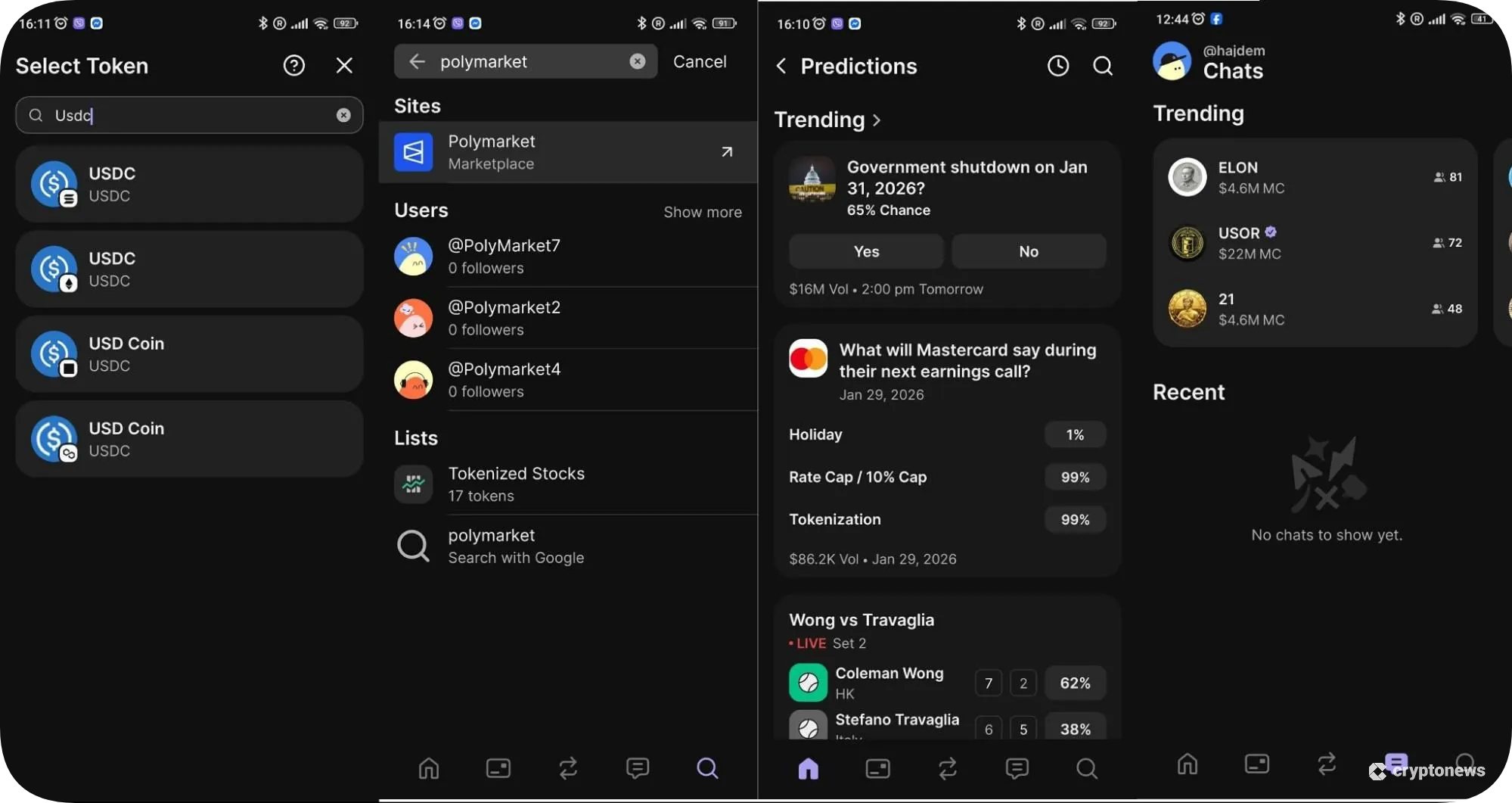
Phantom is a suitable wallet for tracking. You can use it to track wallets that bet on Polymarket, live odds, and scores directly from the app, or join chats to talk with other traders in real time. However, to join chats, you must have at least $1 in your wallet.
On the downside, prediction markets are available only in the mobile app. You won’t find this option on Phantom’s browser extension. Moreover, you must own at least 0.01 SOL to open positions and claim payouts, regardless of whether you use USDC or CASH to pay for contracts.
Phantom Wallet Key Features
- Supports USDC on Polygon, Solana, Base, and Ethereum.
- Prediction markets are powered by Kalshi, enabling you to open positions using SOL, USDC, and Phantom’s native stablecoin, $CASH.
- Track live odds and scores directly from the app or join chats to talk with other traders in real time.
Pros
- Built-in support for Polymarket
- Prediction markets powered by Kalshi
- Open positions using SOL, USDC, or $CASH
- Track live odds and scores
Cons
- Prediction markets are supported only on the mobile app
- You must own at least 0.01 SOL to open positions and claim payouts
6. Trust Wallet – The Best Polymarket Wallet for Beginners
Trust Wallet is a non-custodial wallet that offers prediction markets powered by Myriad, while an integration with Polymarket is promised in the near future. This user-friendly wallet lets you connect to Polymarket via WalletConnect and use it without leaving the app. You can also discover real-world events, view the outcomes for each event, and see their real-time pricing and sentiment.
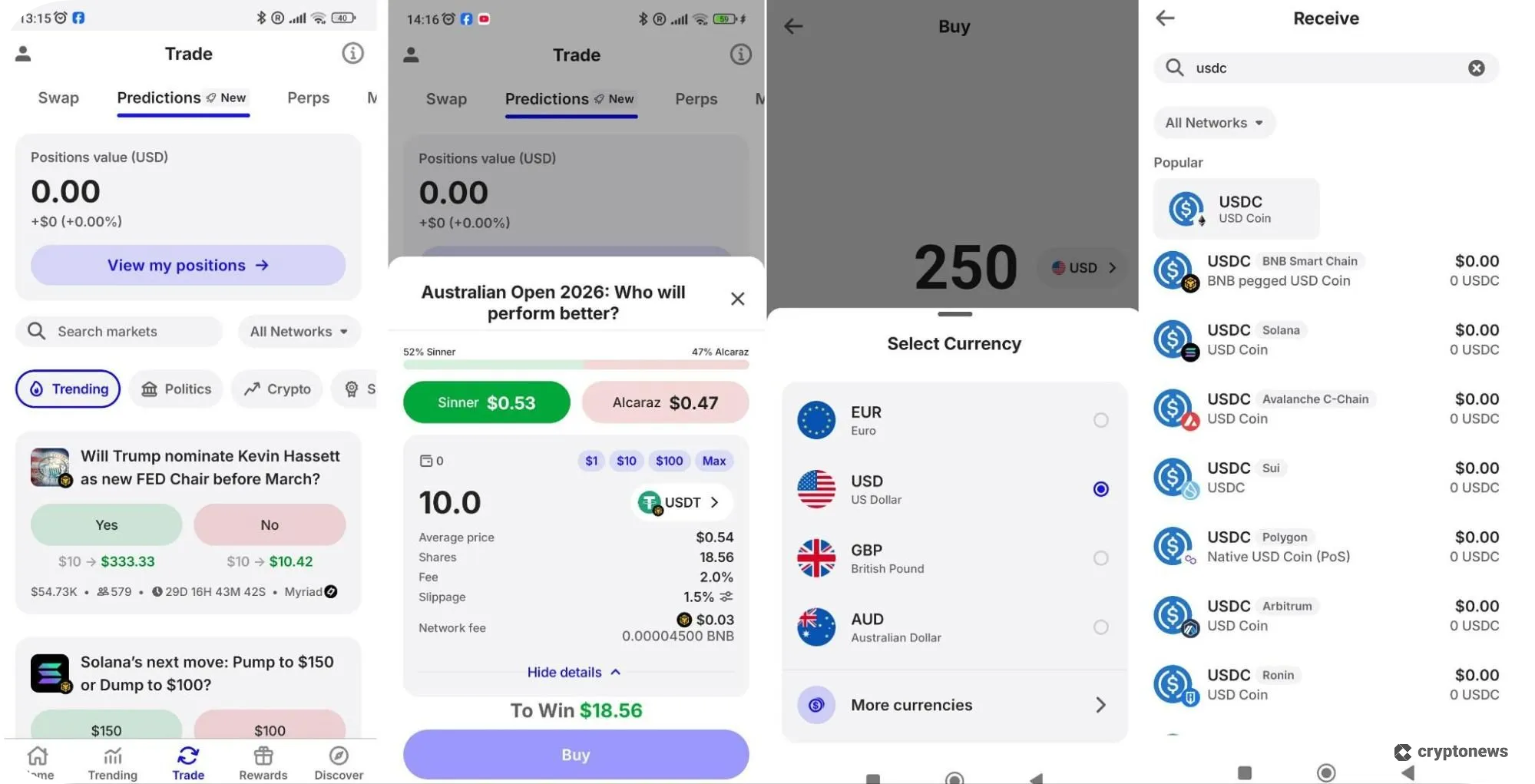
Trust Wallet supports USDC on multiple chains, including Polygon, BNB Smart Chain, Solana, Base, and Avalanche. You can buy USDC using Google Pay, Binance, or fiat currencies. We also appreciated its built-in risk-monitoring tools, such as the security scanner, which automatically detects malicious tokens.
Trust Wallet is available as a mobile app and a browser extension. However, as is the case with Phantom, prediction markets are available only on the mobile app.
Trust Wallet Key Features
- Connect to prediction markets directly from its unified interface, discover real-world events, and view their outcomes.
- Buy USDC using Google Pay, Binance, or fiat currencies.
- Built-in risk-monitoring tools, such as the security scanner.
Pros
- Prediction markets powered by Myriad
- Integrated predictions tab
- Supports USDC on multiple chains
Cons
- Not yet fully integrated with Polymarket
- Prediction markets are supported only on the mobile app
- No 24/7 live chat feature
7. Ledger – The Best Polymarket Wallet for Cold Storage Security
If you’re looking for top-notch security, you won’t go wrong with Ledger. Ledger is one of the best cold storage crypto wallets that keeps your private keys away from online threats. Ledger wallets come with a companion app, Ledger Live, that lets you connect to dApps and prediction markets.
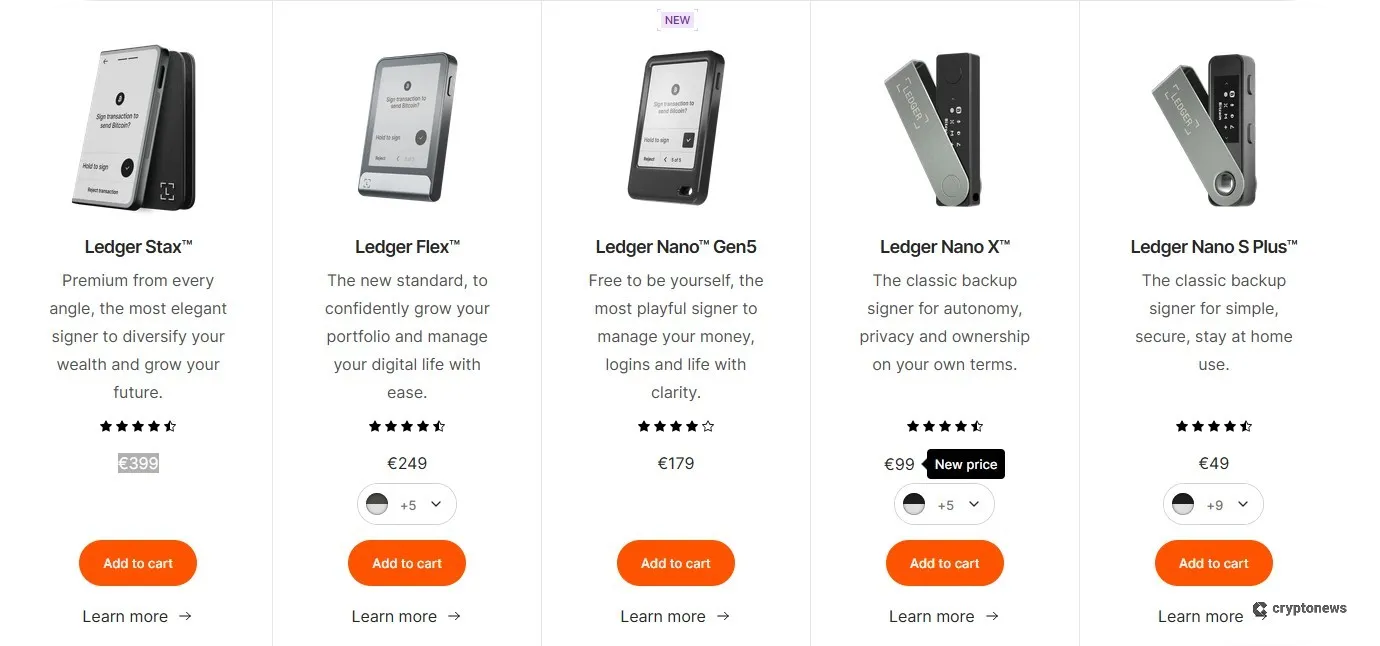
Ledger doesn’t have native Polymarket support. To access the prediction market, you can either connect your Ledger device with a compatible third-party wallet, like MetaMask, or download the Ledger Live app, go to the Discovery section, search for Polymarket, and connect the wallet using WalletConnect.
You can choose between five models – Stax, Flex, Nano Gen5, Nano X, and Nano S Plus. Ledger wallets cost between $49 and $399, depending on the model.
Ledger Wallet Key Features
- Utilizes CC EAL 6+ certified Secure Element (SE) chips to sign transactions and store private keys offline.
- Ledger Live app lets you connect to dApps and prediction marketplaces.
- Compatible with 50+ third-party wallets, including MetaMask, Phantom, and Trust Wallet.
Pros
- Strong security
- Can be integrated with MetaMask
- Comes with a companion app
Cons
- Costs between $49 and $399
- Must be connected to a compatible hot wallet
- You must manually approve all transactions
What Is a Polymarket Wallet?
A Polymarket wallet is a non-custodial smart contract wallet that allows connections to Polymarket and is integrated with the blockchains that the prediction market supports. Polymarket is a decentralized prediction market platform that lets you bet on the outcomes of global events. Polymarket wallets hold your USDC, which you use to buy and sell positions, and ERC-1155 tokens, which represent your shares in “Yes” or “No” market outcomes.
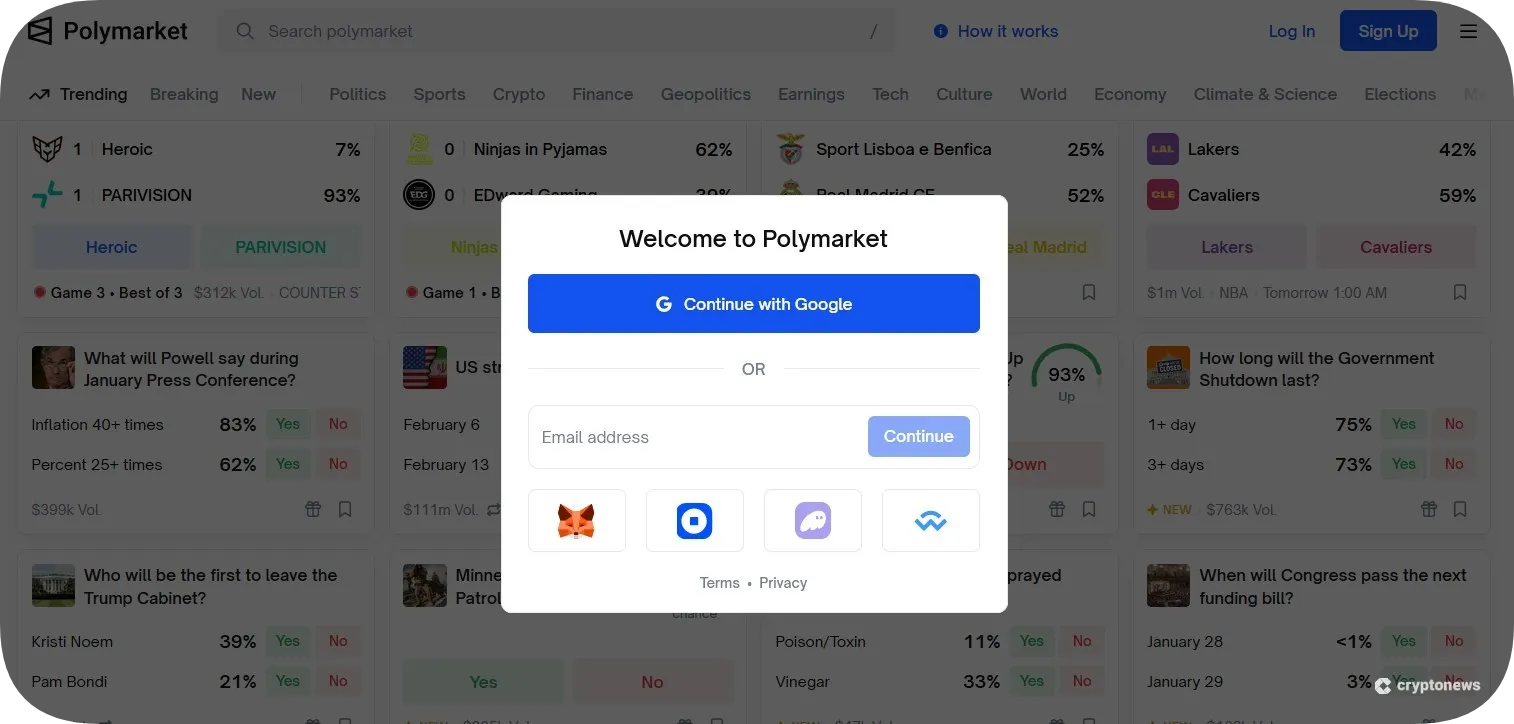
Polymarket uses two types of smart contract wallets – Safe Wallets and Proxy Wallets. The former is created when you connect a browser wallet, such as MetaMask or Phantom, while the latter is created when you sign up via email/Magic Link.
What Is a Polymarket Proxy Wallet?
A Polymarket proxy wallet is a smart contract wallet that Polymarket creates if you sign up using your email or Magic Link. A proxy wallet enables gasless transactions and automatically executes multi-step transactions. This wallet holds both your USDC tokens and your prediction market positions. Even though these types of wallets are created automatically, you have full control over your private key. I.e., Polymarket won’t have access to your funds.
Types of Crypto Wallets for Polymarket
Polymarket wallets generally fall into hot wallets, cold wallets, and custodial vs. non-custodial wallets. Hot wallets connect to the internet for easy trading, while cold wallets store keys offline for stronger security. To use Polymarket, you need a non-custodial wallet, which gives you full control of your private keys and lets you connect to decentralized apps.
Hot Wallets
Hot wallets, like Best Wallet and MetaMask, are connected to the Internet. They let you interact with Polymarket using your mobile phone or browser extension. They are also free to use and easy to set up, which makes them suitable for beginners.
Cold Wallets
Cold wallets, like Ledger, store your private key offline, which makes them safer than hot wallets. However, you can’t connect a cold wallet directly to Polymarket. Instead, you must connect it through a compatible hot wallet. This option is best if you’re investing high amounts or if you only trade once in a while since it adds extra steps to move your crypto from the cold to hot wallet for trading.
Custodial vs. Non-Custodial Wallets
Custodial wallets give third parties, usually crypto exchanges, permission to hold and manage your private keys. This is why you can’t use them to connect to Polymarket.
In contrast, non-custodial wallets give you full control over you private keys and funds. This means you alone manage your assets and can directly connect to decentralized apps like Polymarket.
While custodial wallets are often easier for beginners, non-custodial wallets offer greater control, privacy, and compatibility with Web3 platforms.
Can You Use a Self-Custody Wallet to Trade on Polymarket in the US?
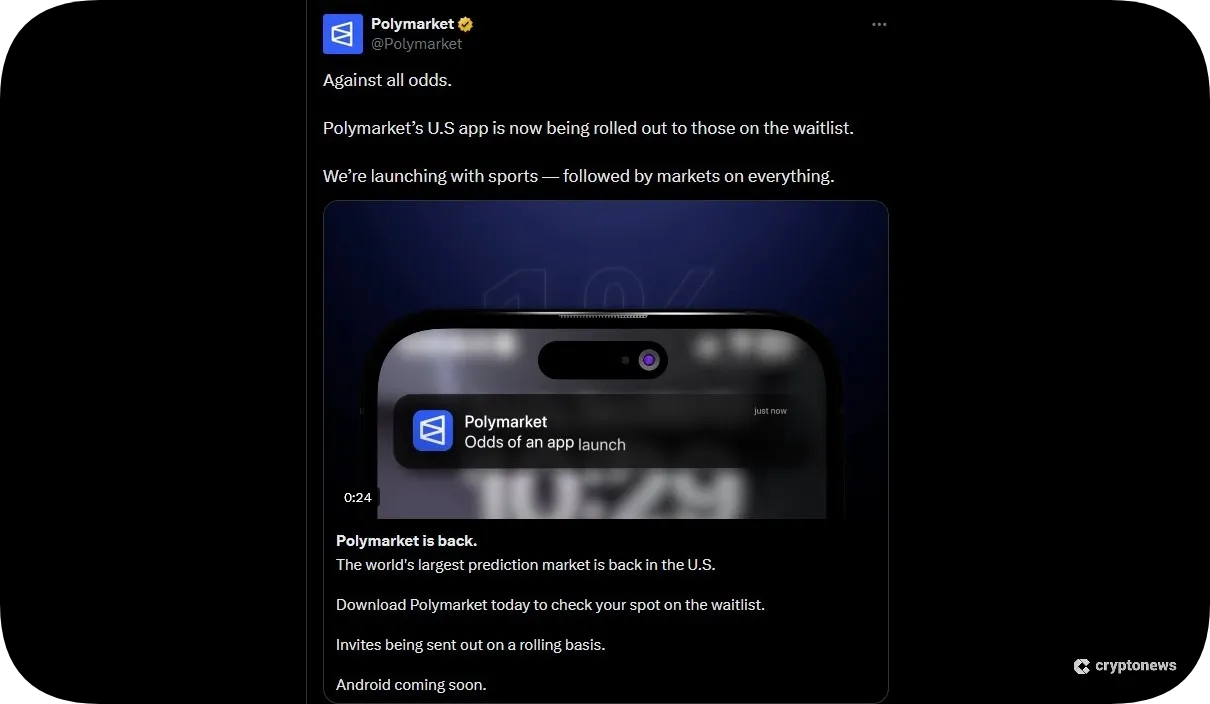
Polymarket wasn’t legal in the US until recently. In 2022, the CFTC accused it of offering unauthorized derivative contracts and failing to register as a DCM or SEF. Polymarket had to pay a $1.4 million fine and agree to block US customers. In July 2025, Polymarket acquired QCEX, a CFTC-regulated derivatives exchange. This enabled it to re-enter the US market in December 2025 as an invite-only platform with restricted markets.
This means that you can’t use a self-custody wallet to trade on Polymarket in the US. Instead, you must use the separate Polymarket US iOS app, which is completely separate from the main website. Keep in mind that the US app is currently in private beta, so you must be invited to access it.
Sports prediction markets will be the first category available on the app, while other categories, such as Politics, Tech & AI, Culture & Entertainment, Macro & Economy, and Science & Innovation, will be added gradually.
In short, Polymarket is a legit platform, although its regulatory status varies by country.
Why Use a Polymarket Wallet?
Polymarket wallets offer many benefits for traders. First, they operate as non-custodial wallets, meaning you have full control over your private key. Secondly, Polymarket uses USDC as its primary trading currency to provide a stable medium of exchange. You can make a deposit on Polymarket using different methods.
For example, you can transfer USDC directly from crypto exchanges, buy USDC using credit/debit cards, or make a deposit from various supported chains, such as Ethereum, Solana, Arbitrum, and Base – your assets are automatically bridged to USDC on Polygon.
Once an event on Polymarket resolves, the winning shares are automatically converted into USDC ($1.00 USDC per share) and transferred to your proxy wallet. You can use these shares to trade on other markets or withdraw them to an external wallet. Most markets have no trading fees. Polymarket only charges taker fees on its 15‑minute crypto markets.
Polymarket wallets are also suitable for copy-traders. Namely, all trades on Polymarket are public. You can track high-performing wallets or use bots to automatically replicate the trades. And finally, Polymarket’s proxy wallet system supports atomic batched transactions. This enables you to batch multiple orders into a single request.
How to Choose a Wallet for Polymarket
Finding the best Polymarket wallet can be a nightmare if you don’t know what to look for. To help you out, we’ve created a short guide in which we discuss the key factors to consider when choosing a wallet.
Look for Native Polymarket Support
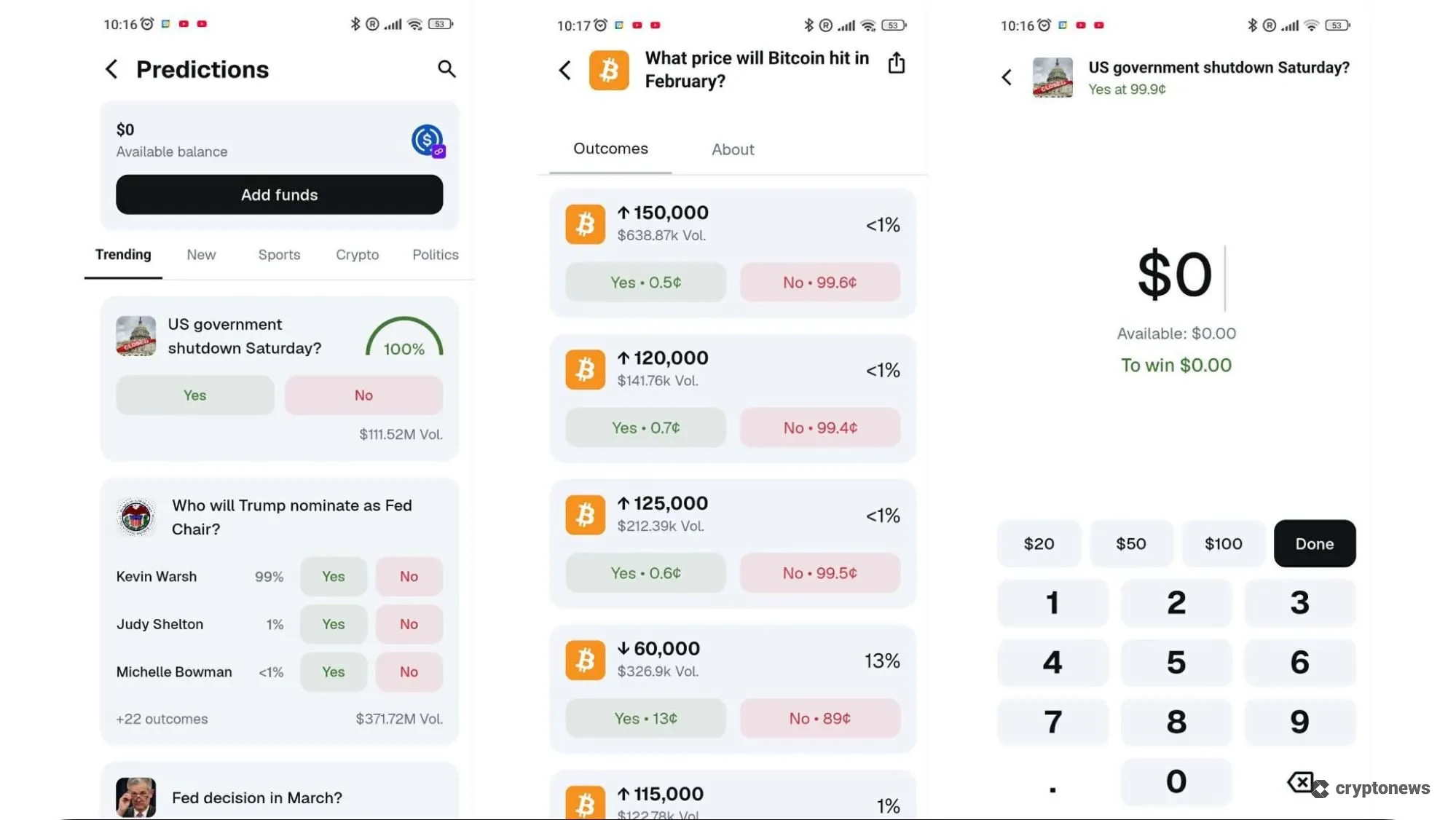
Look for wallets with built-in Polymarket support, such as MetaMask. This enables you to connect to Polymarket, deposit funds, and place predictions directly from the wallet. I.e., you won’t have to manually connect your wallet using WalletConnect or switch between the apps. Wallets with built-in Polymarket support also let you fund your account much faster via the one-tap funding feature.
Check the Available Networks for Polymarket Deposits/Withdrawals
As mentioned before, Polymarket uses USDC on Polygon as its primary trading currency. However, it also supports deposits and withdrawals from other networks thanks to its multi‑chain bridge infrastructure. Whichever network you use, Polymarket will automatically bridge your deposited assets to USDC on Polygon.
Keep in mind that some networks are faster and cheaper than others. For example, depositing USDC on Polygon and Solana is much cheaper and faster than depositing USDC on Ethereum. The same applies to L2 networks such as Base, Arbitrum, and Optimism. This is why you should opt for wallets that support multiple blockchains, such as Best Wallet, which supports 60+ networks, including Polygon, Ethereum, Solana, BNB Chain, and Base.
Verify Security Measures
Polymarket is a non-custodial platform, meaning you alone are responsible for your private keys. If your funds are stolen, Polymarket cannot return them to you. This is why choosing a wallet with strong security is a must. Opt for wallets with advanced security features, such as MPC key-sharing technology, biometric authentication, and built-in risk-monitoring tools. You should use cold wallets for long-term storage and hot wallets for small and frequent trades.
For example, cold wallets like Ledger store your private keys offline. You must also sign each transaction physically on the device. However, Ledger is compatible with 50+ third-party wallets, such as MetaMask, which lets you connect to Polymarket while keeping your private keys offline.
Look for Extra Features Like Polymarket Wallet Tracking
The best Polymarket wallet should offer more than basic USDC storage. It should also offer additional features to improve your trading experience, such as wallet tracking, an integrated social feed, copy-trading bots, and AI agents.
Some wallets integrate these tools directly into the interface. For example, MetaMask can be connected to Polymarket copy-trading bots that automatically mirror trades from selected wallets.
Phantom also provides additional tools, including the ability to track live odds and scores while interacting with other traders in real time. Meanwhile, Coinbase Wallet offers an integrated social feed that helps you discover trending events and popular prediction markets.
Lastly, Polymarket wallet trackers let you monitor the activity of other traders on the prediction market. By following profitable or high-volume wallets, you can see which events they’re betting on, how much capital they’re allocating, and how their positions change over time. This can help you identify trends, discover new markets early, and learn from experienced participants.
How to Secure Your Polymarket Wallet
Here are some practical tips to keep your Polymarket wallets safe:
Keep the Apps Updated
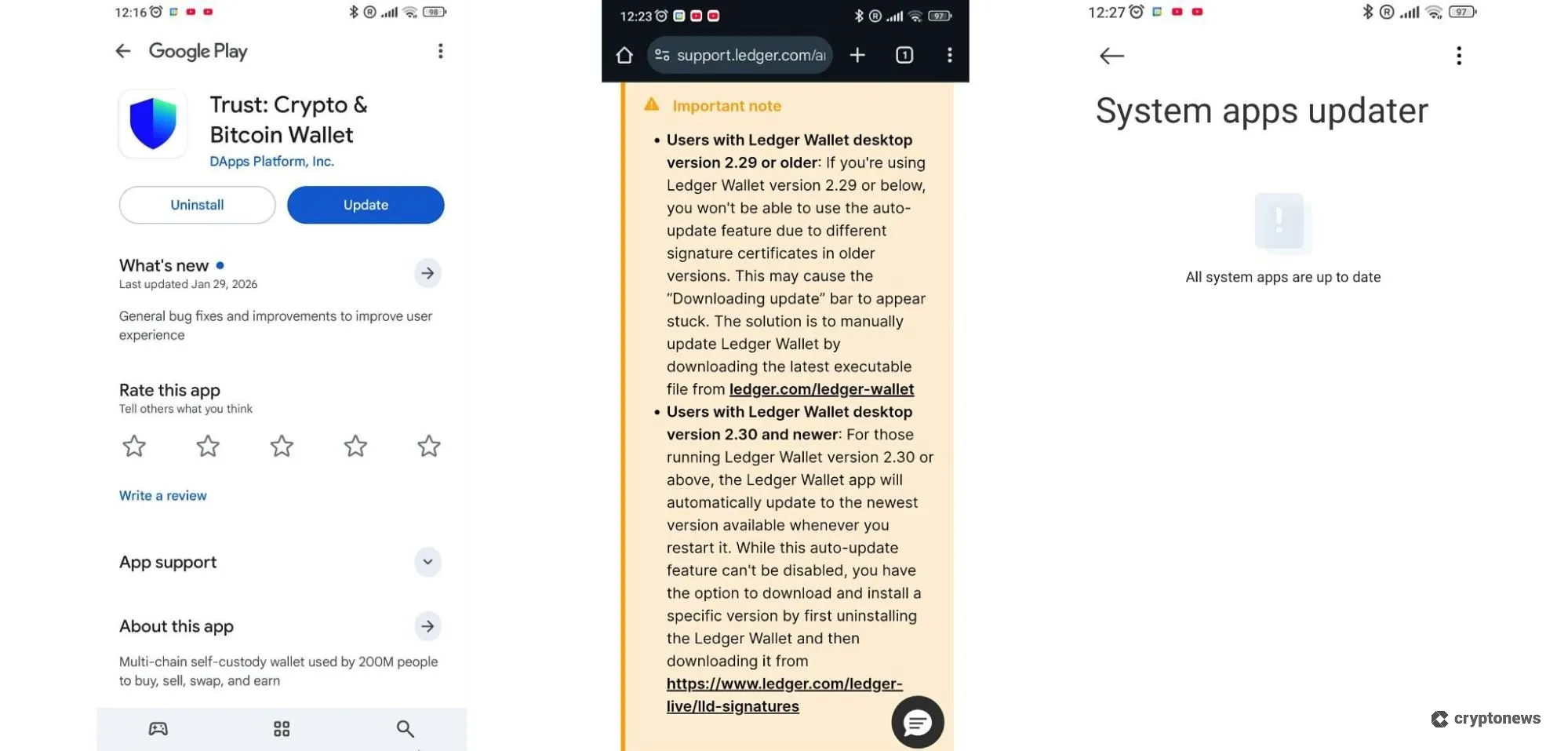
Wallet developers regularly release updates for their apps to address potential vulnerabilities and enhance their security. Reputable Polymarket wallets will notify you of new app versions and require you to download them through their official channels. I.e., they will never ask you to download a file via messaging apps, like WhatsApp or Telegram. You should also update your phone or desktop browser since outdated systems are easier to hack.
Never Share Your Private Key
Polymarket and legitimate crypto wallet providers will never ask you to share your private keys or seed phrase. The only time you must use a seed phrase is when you create or restore your wallet. If you receive a message to use a seed phrase to verify your account or resolve a specific problem, do not click on the links. Instead, close the message and report it using the wallet’s official support channel.
Use Hardware Wallets
Hardware wallets store your private keys offline, making them more secure than hot wallets. Moreover, they require you to sign transactions manually by tapping the corresponding buttons, which reduces the risk of unauthorized transactions. Use hardware wallets for larger holdings and software wallets for small, everyday transactions.
Verify You’re Using the Right Polymarket Site
Phishing is one of the most common crypto scams. This is a type of scam in which hackers create fake websites that mimic legitimate platforms to trick you into sharing your personal information. To verify you’re using the right Polymarket site, polymarket.com, check its URL. Scammers use domains that look like the real ones. However, they are usually misspelled or contain extra letters (e.g., polymrket.com).
Protect Your Account
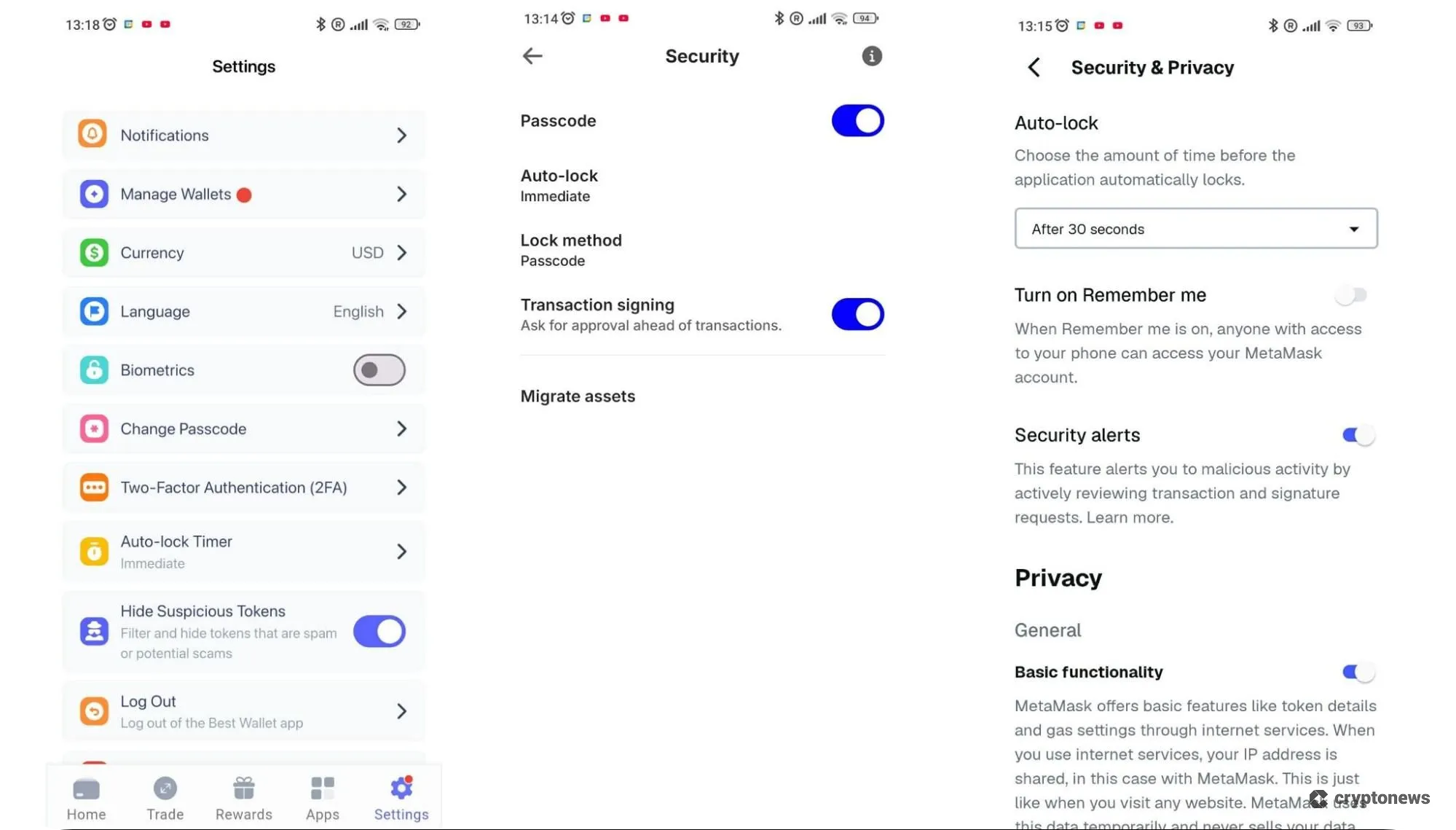
Protect your account by using strong passwords and enabling two‑factor authentication (2FA). You should take advantage of other available security features, such as biometric authentication, auto-lock, security alerts, network details checks, and secure auto sign. And remember, never put all your coins in one wallet.
Use a VPN
Avoid using public Wi-Fi networks because they are easily intercepted by hackers. Instead, use a reputable VPN before connecting your wallet to Polymarket. A VPN hides your IP address and encrypts your connection, so your Internet Service Provider can’t see your activity. Polymarket doesn’t block VPNs. However, you are not allowed to use it if you are from a country where Polymarket is restricted.
Which Blockchain to Use for Polymarket?
Polymarket supports deposits on the following blockchains – Polygon, Ethereum, Arbitrum, Solana, Base, and BNB Chain. Each chain offers different transaction speeds and fees.
| Blockchain | Transaction Speed | Network Fees |
| Polygon | ~5 seconds | ~$0.0002– $0.005 |
| Ethereum | 1 to 5 minutes | ~$0.50 – $5 |
| Arbitrum | 1–2 seconds | ~$0.006 – $0.01 |
| Solana | ~0.4 seconds | ~$0.0004 – $0.002 |
| Base | ~2 seconds | ~$0.01 – $0.10 |
| BNB Chain | ~0.75 seconds | ~$0.09 |
Which network to choose? It depends on your preferences:
- Use Polygon for direct deposits without manual bridging
- Use Base and Arbitrum for low fees
- Use Solana for fast transactions
- Use the BNB Chain if you’re depositing BNB
- Use Ethereum if your USDC is already on the Ethereum mainnet
All wallets from our list support USDC on Polygon, Ethereum, Solana, and Base. Other notable wallets you can use to trade on Polymarket include Zengo, Trezor, OKX wallet, and Cypherock X1.
How to Set Up and Use a Polymarket Wallet: Step-by-Step Tutorial
Here’s how to set up and use the best Polymarket wallet in a few simple steps:
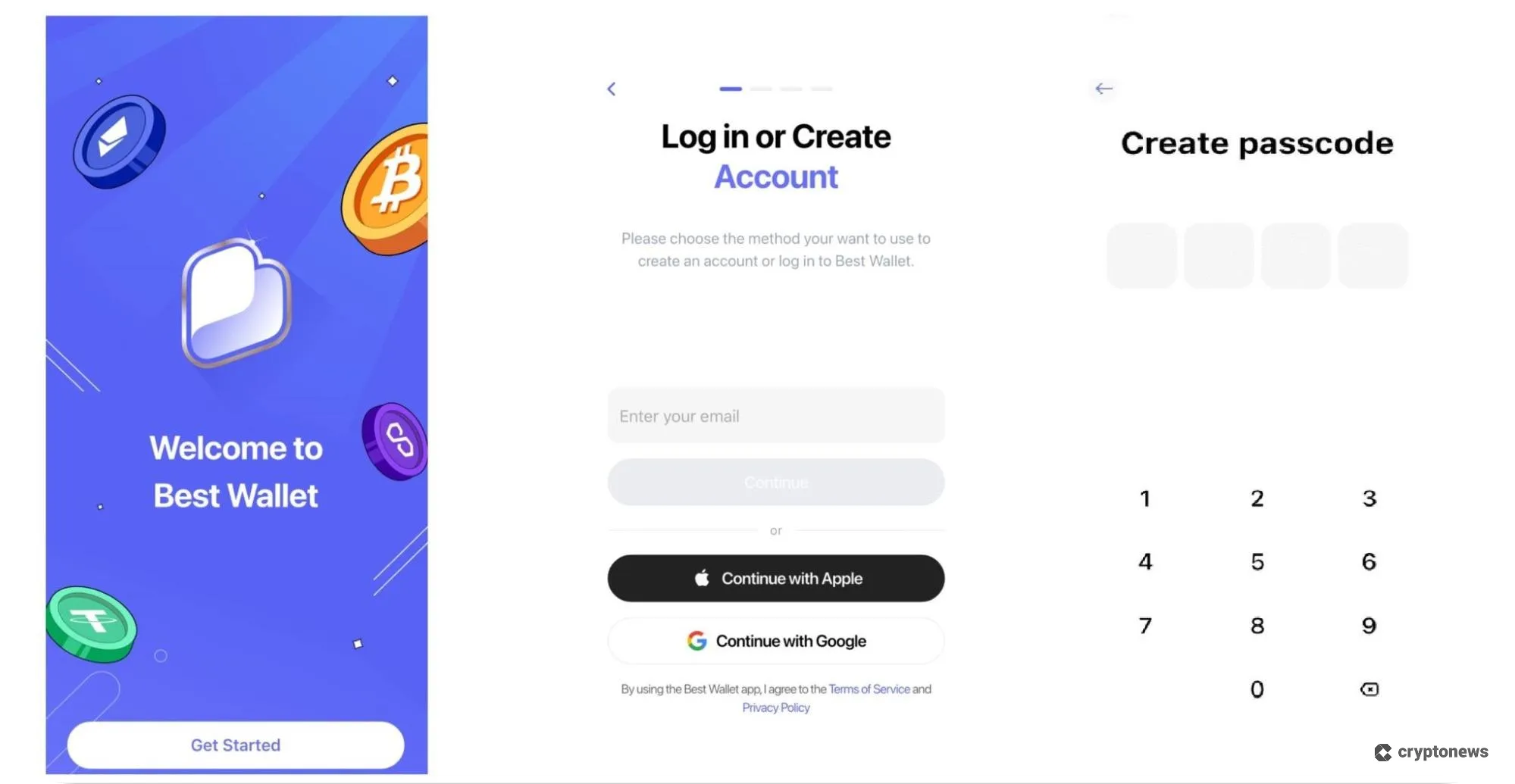
Step 1: Download the Best Wallet App
Visit the Best Wallet’s official page and tap the Download button. Next, enter your email and create a passcode.
Step 2: Visit Polymarket
Go to the official Polymarket website and tap the Sign up button. Click the WalletConnect icon, choose Best Wallet from the list. Enter your passcode and tap Continue and Confirm to connect the wallet to Polymarket.
Visit Polymarket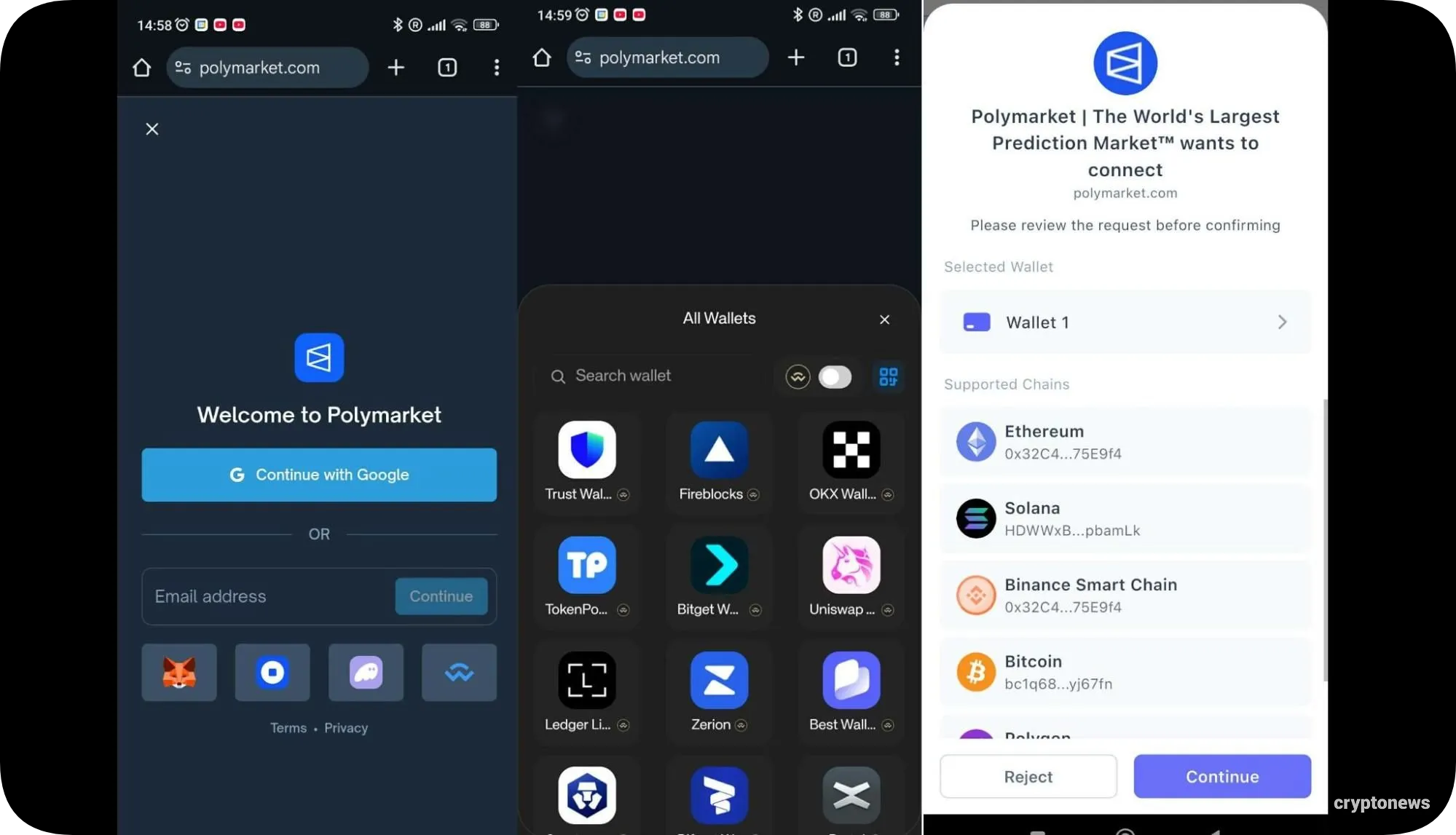
Step 3: Fund Your Account
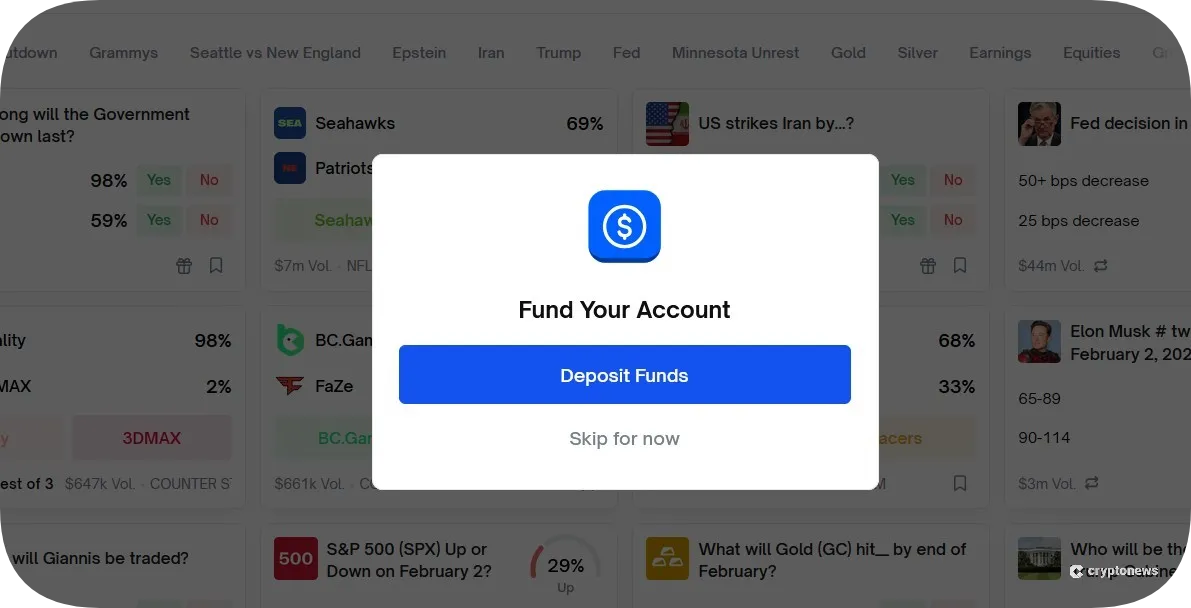
Tap the Deposit button to fund your account with USDC. Choose a deposit method and enter the amount you wish to buy.
Step 4: Choose a Market
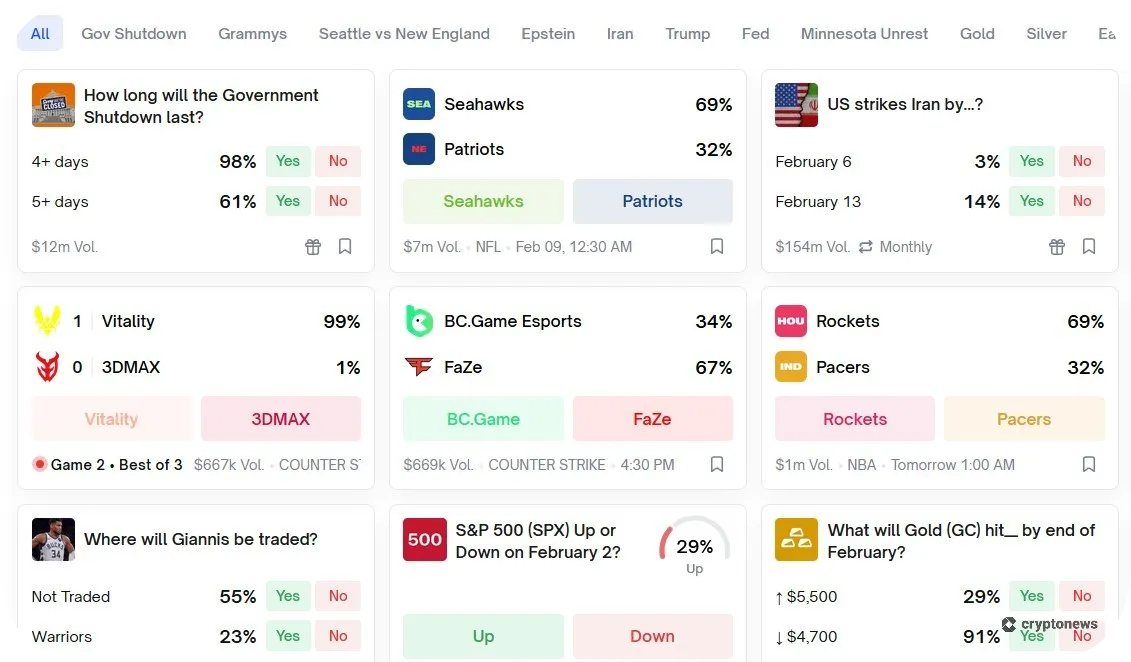
Now, choose a market, select your outcome (YES or NO), and set your desired number of shares. If your prediction is correct, you earn $1.00 per share.
Step 5: Cash Out Your Winnings
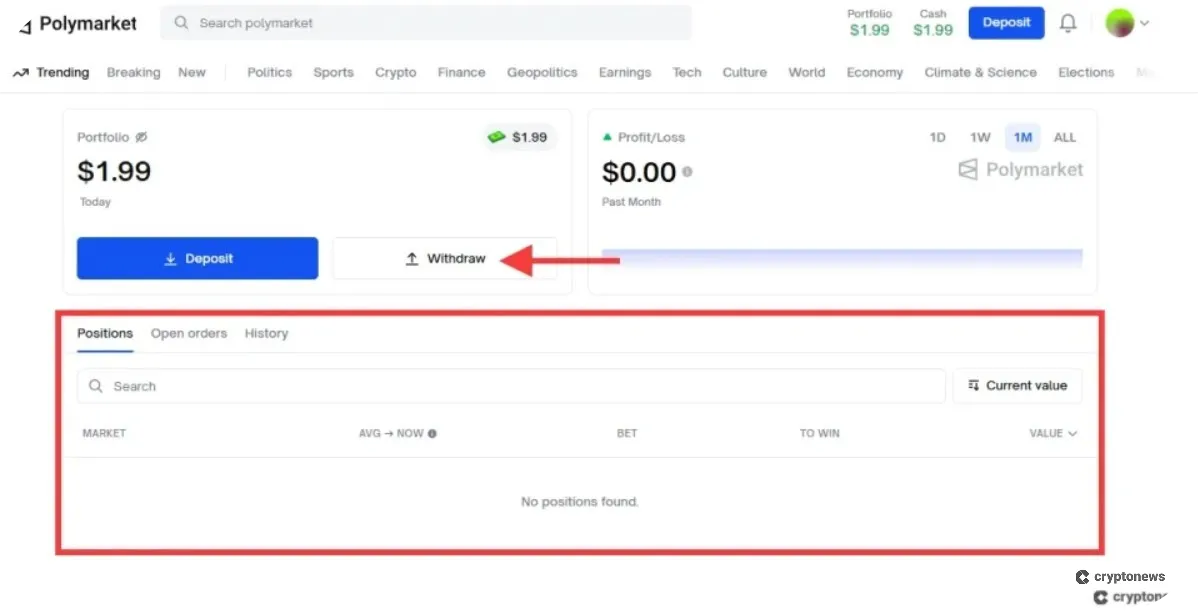
Cash out your winnings by navigating to your portfolio and tapping the Withdraw button.
Verdict: What Is the Best Wallet for Polymarket in 2026?
A Polymarket wallet holds your USDC tokens and lets you buy Yes or No shares on Polymarket, a decentralized prediction market platform that lets you bet on the outcomes of global events. Polymarket wallets are non-custodial, meaning you are responsible for your private keys. US traders can’t trade on Polymarket, since the US is on its restricted regions list. Instead, they must use a separate Polymarket US iOS app, which is currently in private beta.
That said, the best Polymarket wallet in 2026 is Best Wallet because it supports 60+ blockchains, including USDC on Polygon, Ethereum, Solana, BNB Chain, and Base. Plus, it comes with an integrated DEX, so you can buy USDC at the best rates without going through KYC verification. This is also one of the easiest wallets to set up. Just download the app and enter a passcode.
Visit Best WalletFAQs
What is the most secure wallet for Polymarket?
What fees do Polymarket wallets charge?
Do I need USDC on Polygon to use Polymarket?
What’s the difference between custodial and non-custodial wallets for Polymarket?
Can I use a hardware wallet for Polymarket?
How to connect WalletConnect to Polymarket?
What are the best mobile wallets for Polymarket?
References
- What Is MPC (Multi-Party Computation)? (Fireblocks)
- BNB Chain x Polymarket: Bringing Prediction Markets to BNB Chain (BNB Chain)
- Learn how Trust Wallet’s Security Scanner keeps you safe from the latest crypto traps (Trust Wallet)
- CFTC Orders Event-Based Binary Options Markets Operator to Pay $1.4 Million Penalty (CFTC)
- Geographic Restrictions (Polymarket)
- What is a VPN? How It Works, Types, and Benefits (Kaspersky)
2M+
250+
8
70






 in numbers

About Cryptonews
Our goal is to offer a comprehensive and objective perspective on the cryptocurrency market, enabling our readers to make informed decisions in this ever-changing landscape.
Our editorial team of more than 70 crypto professionals works to maintain the highest standards of journalism and ethics. We follow strict editorial guidelines to ensure the integrity and credibility of our content.
Whether you’re looking for breaking news, expert opinions, or market insights, Cryptonews has been your go-to destination for everything cryptocurrency since 2017.